


Divvy
4.6390.00 Reviews
App Specs
- Version
- 2026.32.3.1787124437
- Updated On
- License
- Free
- Downloads
- 100,000+
- Developer
- Lyft, Inc.
- Categories
- Maps & Navigation
- Platform
- Android
Screenshots


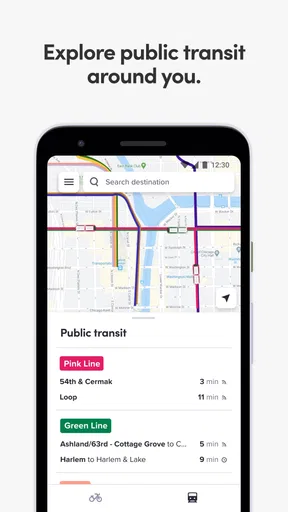
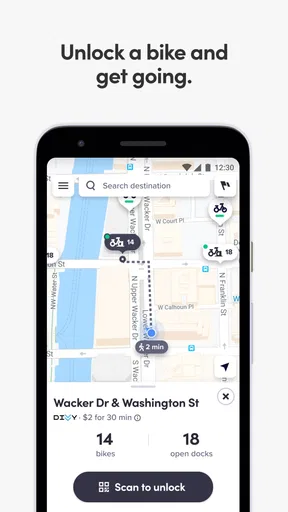
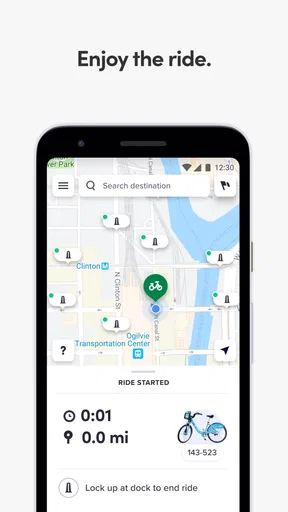
 Analysis by AppCompare
I tested Divvy as a practical city-mobility app rather than treating it like a simple map. Its purpose is focused: helping people use Chicago’s Divvy bike-share system from a phone. That narrow focus is its biggest strength. Instead of asking you to compare every transport option in the city, it puts bike-share planning at the center and makes the most sense when you are already considering a short ride between neighborhoods, a train stop, work, school, or an appointment.
Divvy is a free Maps & Navigation app from Lyft, Inc., with an Everyone age rating. It has been available since May 10, 2018, and its current version is 2026.31.3.1786519319 for devices running Android 9 or later. The app has a 4.6 average from around 2K ratings, with hundreds of written reviews and over 100K installs. Those figures suggest a well-established tool, but the real question is more practical: does it remain useful when you are standing on a Chicago sidewalk, carrying a bag, watching the weather, and trying to find a bike quickly?
How connectivity changes the Divvy experience
I treat connectivity as part of the trip plan, not a technical detail to troubleshoot only after I arrive. Before setting out, I decide which station choices matter most and keep the destination area in mind, so a slow connection does not force me to make every decision from scratch. That small adjustment also makes it easier to tell when the app is helping—and when a simpler backup is the better next step.
Why the app feels most useful before you leave
My best experience with Divvy starts before the ride. When I have a destination in mind, I can use the app to think through the first and last parts of the trip instead of assuming that the nearest station will automatically be convenient. A station may be close to my starting point but awkward for the destination, or the reverse may be true. Looking at the available network while I still have a reliable connection gives me time to choose a more sensible route.
This matters because bike-share is not only about finding a bicycle. It is also about finding a suitable place to finish. A ride can look easy until the final station is several blocks away from the building I need, or until I realize that I will have to walk back in the opposite direction. I use Divvy to check both ends of the journey, then decide whether the bike is genuinely faster than walking, public transit, or a rideshare.
The app is particularly helpful for a visitor who does not know Chicago’s station layout. A regular rider may remember a few favorite locations, but a visitor needs a visual overview and a quick way to orient themselves. That is where a dedicated Divvy tool is more useful than a general map app that happens to show cycling directions. The dedicated context keeps the decision centered on bike-share availability and station placement.
When a weak connection becomes part of the trip
The main limitation is also easy to understand: this is a connected mobile experience. Station information and trip decisions are most dependable when the phone can reach the service. In a busy street, underground entrance, crowded event area, or building with inconsistent reception, I would not wait until the last second to begin checking. A map that was convenient a minute ago may be less helpful when I am already beside a station and need current information.
Worth Reading Before You Choose

EA SPORTS FC Mobile 26 Is a Bigger Football Game, but It Takes Time

Flipboard Shows What News Apps Must Do Beyond the Feed

Switching to Android Auto Means Rethinking Your Driving Routine

Google Calendar Makes a Crowded Week Easier to Manage

Ludo King Makes the Most of the Minutes Between Plans

Baby Panda World Brings Quick Play to Modern Phones, but Its Game Library Feels Busy
I treat the app as something to consult in stages. First, I check the starting station and destination area while connected. Then I keep the plan simple enough to remember: which station I am using, which nearby destination station is acceptable, and what I will do if that choice is inconvenient. This is not a claim that the app provides offline access; it is simply a sensible habit for any service whose usefulness depends on current network communication.
Another small but important habit is avoiding unnecessary repeated checks while moving. If I am walking toward a station, constantly refreshing the app can make me less aware of traffic, cyclists, and pedestrians. I prefer to look before leaving, then check again only when the decision really changes. That makes the app a planning aid instead of something I stare at throughout the journey.
A realistic weekday use case
Imagine leaving a train station for a meeting several neighborhoods away. Walking the entire distance would take too long, while a car would be excessive for a short urban trip. I would open Divvy near the station, identify a practical starting point, and then inspect the area around the meeting location for a reasonable place to finish. If the connection is stable, this takes much less effort than wandering around hoping to spot a suitable station.
The useful part is not just speed. I can make the decision before committing to the bike. If the destination side looks inconvenient, I can stay with transit or walking. If the arrangement works, I can begin the ride with a clearer idea of where I am going. For a time-sensitive appointment, that advance check is more valuable than discovering a problem halfway through the trip.
For this kind of journey, I would still leave a little flexibility. City streets change, entrances are easy to miss, and the most visually obvious station may not be the one that makes the final walk easiest. Divvy helps narrow the choices, but it does not remove the need for ordinary street awareness.
Using Divvy in different mobile situations
The app fits best when I am already mobile: walking out of a station, leaving a café, heading away from an office, or deciding how to cover the final part of a longer trip. The phone is being used as a quick decision tool, not as a full travel diary. Its value comes from reducing uncertainty at the moment when I need a bike-share option.
That also means the screen can be harder to use in bright sunlight, while wearing gloves, or when one hand is occupied. I would rather make the main plan before stepping into traffic and use short checks afterward. A phone mounted for continuous consultation would not suit the way I use a bike-share service; I want to ride, not keep interacting with the screen.
For visitors, the app can serve as a bridge between a broad Chicago itinerary and a specific short journey. Someone may know they want to see several areas but not know which legs are realistic by bike. Divvy encourages a more grounded plan: check a starting point, check the destination side, and decide whether the walk around each station is acceptable.
For daily commuters, the benefit is different. A commuter can develop a repeatable routine around familiar areas and use the app when the usual plan changes. That might mean starting from a different station, ending closer to an appointment, or checking the network before leaving work. The app is less about discovering a new hobby and more about making a familiar urban calculation quickly.
What happens when the plan fails
A good connected app should be judged not only by the ideal case but also by how users recover from uncertainty. With Divvy, I would avoid building a trip around one single station. I keep a nearby alternative in mind, especially when the ride is tied to a train departure, a meeting, or a reservation. This is one of the most useful practical trade-offs: a slightly longer walk to a second option may be better than repeatedly refreshing the first one.
If the app is slow to respond, I first check the basics rather than assuming the whole service is unusable. I move away from an obstructed spot, wait for the connection to settle, and reopen the relevant view instead of tapping randomly. If I already know the surrounding streets, I can continue toward a nearby station while deciding whether the bike remains worthwhile. If I do not know the area, I would switch to a simpler backup plan rather than losing time in place.
This recovery mindset is especially important for visitors. A local rider may recognize another station from memory, while a visitor may not. I would recommend that newcomers identify two plausible stations around the destination before starting. That small amount of preparation protects the trip from a single connectivity problem or an inconvenient station choice.
There is also a human limitation that no app can solve completely: a map view cannot tell me how comfortable I will feel on every block, how crowded a sidewalk is, or whether construction has changed the easiest approach. I use Divvy for the station decision, then use normal judgment for the street-level part. That separation keeps expectations realistic.
Keeping mobile data use sensible
I do not see a reason to keep Divvy open continuously during a ride. The efficient workflow is to check the plan, close what I do not need, and reopen the app only when I reach a decision point. That is kinder to battery life and mobile data than repeatedly refreshing a map while traveling through the city.
When I am on a limited data plan, I would also avoid combining several demanding tasks at once. I can use Divvy for the bike-share decision and rely on a basic mental route or another navigation tool only when necessary. The point is not to avoid using the app; it is to use it deliberately, with the most important checks made before I start moving.
A useful routine is to note the destination street or landmark before leaving the station area. If the connection becomes unreliable later, I am less dependent on opening the app for every small correction. This is particularly helpful when I am traveling through areas where reception changes from block to block. Again, that is a practical way to use a connected service, not evidence of an offline mode.
People who expect a completely self-contained navigation tool may find this approach less convenient. Divvy is specialized, so I still need ordinary awareness of the route and destination. In exchange, I get a cleaner bike-share-focused experience than I would from a general map filled with driving, walking, and transit details that may distract from the immediate question: where should I pick up and finish a Divvy ride?
How it compares with the usual alternatives
Compared with a general maps app, Divvy has a narrower purpose and therefore a clearer decision path for bike-share users. A general map is better when I need detailed turn-by-turn directions, a multi-stop itinerary, or a comparison across walking, trains, buses, and cars. Divvy is better when the central problem is locating and using Chicago’s bike-share network rather than planning every possible transport mode.
Compared with simply walking to a familiar station, the app is more useful when I am in an unfamiliar area or when the destination matters as much as the starting point. Walking from memory can be quicker for a regular rider, especially if the phone connection is poor. I would not open Divvy for every trip I already know perfectly; I would use it when the station choice could affect the whole journey.
Compared with a rideshare app, Divvy offers a different kind of convenience. A car may be the better choice for heavy luggage, poor weather, mobility needs, or a trip where street riding is uncomfortable. Divvy is more appealing for short urban movement when I want to avoid requesting a car and do not need door-to-door transport. The right choice depends on the physical effort and conditions, not only on the map distance.
Compared with another bike-navigation tool, Divvy’s advantage is its direct connection to the Divvy use case. A cycling app may provide richer route planning for someone bringing their own bicycle, while Divvy is the more natural starting point for someone deciding whether a shared bike is available and practical. That distinction is important: the best app depends on whether the bicycle itself or the bike-share network is the focus.
Who should use it, and who should skip it?
I would recommend Divvy to Chicago residents who regularly combine trains, walking, and short bike rides. It is also a good fit for visitors who want a focused way to understand bike-share options without turning a simple trip into a large transport-planning project. People with changing schedules may appreciate being able to reconsider the station choice close to departure.
I would be more cautious if you rarely use bike share, dislike checking a phone before traveling, or need a fully detailed navigation system that handles every mode in one place. Someone carrying bulky items, traveling with young children, or dealing with weather that makes cycling unpleasant may be better served by transit, walking, or a car. The app cannot make an unsuitable bike trip suitable.
It is also not my first choice for a long, carefully optimized cycling route. A dedicated cycling planner may be more appropriate when route surface, elevation, or extended navigation is the main concern. Divvy’s strength is the practical connection between a city trip and the bike-share network, not replacing every other kind of navigation.
My connectivity verdict
After using Divvy as a real trip-planning tool, I see it as most valuable when I check it early, keep a backup station in mind, and avoid treating the phone as an always-on guide. Its connected nature is manageable as long as I plan around it. The app works best when it answers a focused question quickly: can a Divvy ride sensibly connect these two parts of my day?
The free price makes it easy to keep available even if I use it only occasionally, and the Everyone rating makes it approachable for a broad audience. Lyft, Inc. has kept the product focused on Chicago’s bike-share context rather than turning it into a generic travel app. That focus is exactly why I would recommend it to someone who intends to use Divvy, but it is also why I would not recommend it as a universal replacement for maps, transit planners, or cycling navigation.
My honest recommendation is to install it if Divvy is part of your regular Chicago travel options, then use it with a simple connectivity-aware routine. Check the start and finish before you leave, avoid relying on one station, and keep a non-app backup for moments when reception or circumstances change. Used that way, Divvy is a practical companion for short urban rides rather than a source of unnecessary screen time.
Pros
- Makes splitting shared expenses quick and straightforward.
- Supports fair cost tracking for groups
- trips
- and households.
- Reduces confusion by keeping payments and balances organized.
- Useful for monitoring who owes what over time.
- Clean interface makes adding expenses easy for most users.
Cons
- Requires everyone in the group to use the app consistently.
- Some features may depend on account setup or subscription access.
- Currency and regional payment support may vary by location.
- Notifications can become excessive in active expense groups.
- Users may need to settle balances outside the app manually.
FAQs for Divvy
What is Divvy and what can I use it for?
Divvy is a personal finance and expense-management app designed to help users organize spending, track transactions, and manage shared or individual budgets from a mobile device. Depending on the features available in your region and account type, it may also help with expense reporting, payment management, receipts, and financial oversight. It is best suited to users who want a clearer view of where their money is going.
Is Divvy free to download and use?
Divvy may be free to download, but access to its complete set of tools can depend on the version of the service, your location, and whether you are using an individual or business account. Some features may require registration, an eligible account, or an organization invitation. Before downloading, review the current pricing, subscription terms, and any applicable transaction or service fees shown in the official app listing.
Is Divvy safe for managing financial information?
Divvy handles potentially sensitive financial and personal information, so security should be an important consideration before creating an account. The app may use account authentication, encryption, and other standard protections, but no digital service is completely risk-free. Use a strong, unique password, enable available security options, keep your device updated, and download only the official version from Google Play or the Apple App Store.
Can I use Divvy for business expenses and receipt tracking?
Divvy is particularly useful for organizing business spending when the relevant account and administrative features are available. Users may be able to categorize transactions, attach receipts, monitor budgets, and submit or review expenses through the app. However, the exact workflow can vary according to company settings, permissions, and plan type. Confirm that the app supports your organization’s approval and accounting requirements before relying on it.
What should I check before downloading and setting up Divvy?
Before installing Divvy, check whether your device meets the supported Android or iOS requirements and whether the service is available in your country. You should also review the app’s permissions, privacy policy, account requirements, and current terms. If Divvy is provided through an employer or organization, make sure you have the correct invitation or login details, since some functions may not work with a personal account alone.


